CI/CD Deployment Process & Evidence
Purpose
The purpose of this document is to provide guidance on our production CI/CD deployment process for the engineering team and collecting evidence for SOC2 in Vanta.
Ownership
Responsible Team: Engineering
Primary Owner: VP of Engineering - Jacob Ditslear
Secondary Owner: Staff Engineer - Kevin Mulcrone
Reviewer: Chief Operating Officer - Nick Delozier
Frequency & History
This document should be reviewed at least quarterly and when these processes are changed. At the time of update, this document should be uploaded to Vanta
Version History
| Date | Reviewer | Summary of Changes |
|---|---|---|
| 2026-04-10 | Jacob Ditslear | Initial creation |
| YYYY-MM-DD | NAME | Updates… |
Source Control: GitHub
All of our codebases are stored in GitHub under our organization.
Deployed Projects
Onramp: Our NextJS monorepo that deploys our web applications (client, admin, partners, sanity) and is deployed via Vercel. trunk: Our Phoenix Elixir project that holds our API and is deployed through GCP
Systems in Use
Vercel
Vercel is used to build, deploy, and host applications. It automatically triggers deployments from GitHub on pull requests (preview environments) and merges to the main branch (production deployments). Each deployment is versioned and associated with a specific commit SHA.
Google Cloud Platform (GCP)
Within GCP, we use Google Cloud Build as our CI/CD platform to build docker containers on merge to main, to deploy docker containers to environments, and to promote images from our integration environment to production. Each build is logged and each container is associated with a specific commit SHA. Docker images are stored in Artifact Registry in our integration environment after the build succeeds, only promoted images are stored in the Production Artifact Registry.
Vercel
Deployment Workflow
- Open a pull request to merge the branch
devintomain, create a new tag and add the proper release notes. Then, add at least one senior engineer as a reviewer. Merge is blocked without an approval from a senior engineer, and it cannot be the author. - After another engineer approves the PR, the pull request can be merged into main which will trigger the build and deployment into the production environment in Vercel.
- The author of the pull request should ensure that main is properly tagged in GitHub
- Navigate to Releases
- Click "Draft a New Release"
- Create a new tag
- Click "Generate Release Notes" and review the notes
- Click "Publish Release"
Evidence Collection Instructions
These are instructions for updating the evidence, be sure to update the links as you collect evidence!
Evidence
Approved by Senior Engineer
- Navigate to the latest release, then navigate to the related pull request
-
Capture a screen shot displaying the entirety of the page:
-
Display the author of the PR
- Be sure the today's date is in the screen (top-right of mac)
- Show that the PR is approved by a senior engineer
- Show that the Vercel pre-checks have succeeded
- Display the
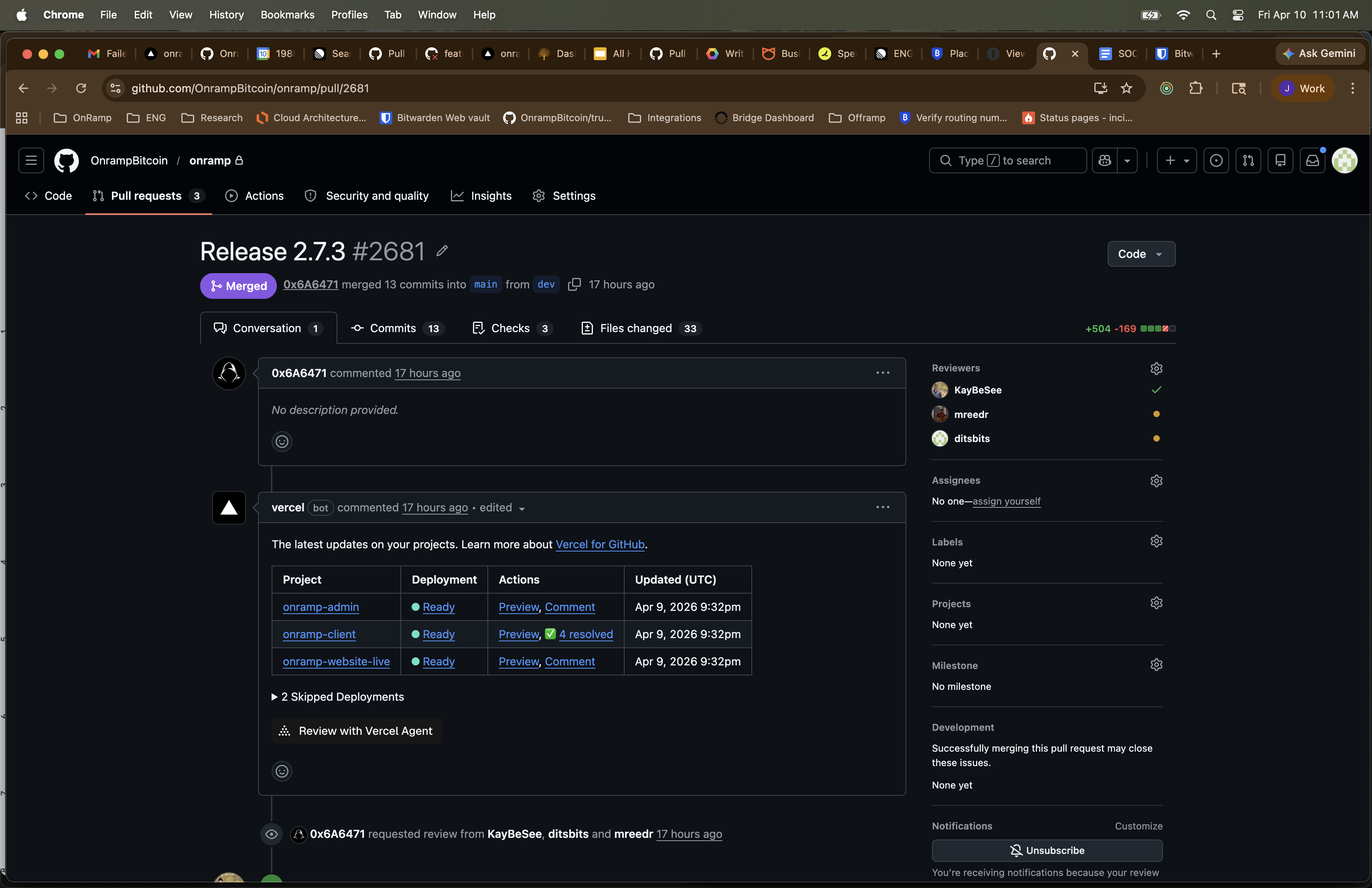 Captured on 2026-04-10 — PR #2681 "Release 2.7.3" merged with approval from KayBeSee. Vercel preview deployments succeeded. Date visible in top-right corner.
Tagged Release
- Navigate to the latest tagged release in Github
-
Capture a screen shot displaying the entirety of the page:
-
Display the relevant tag
- Display the commit sha
- Be sure the today's date is in the screen (top-right of mac)
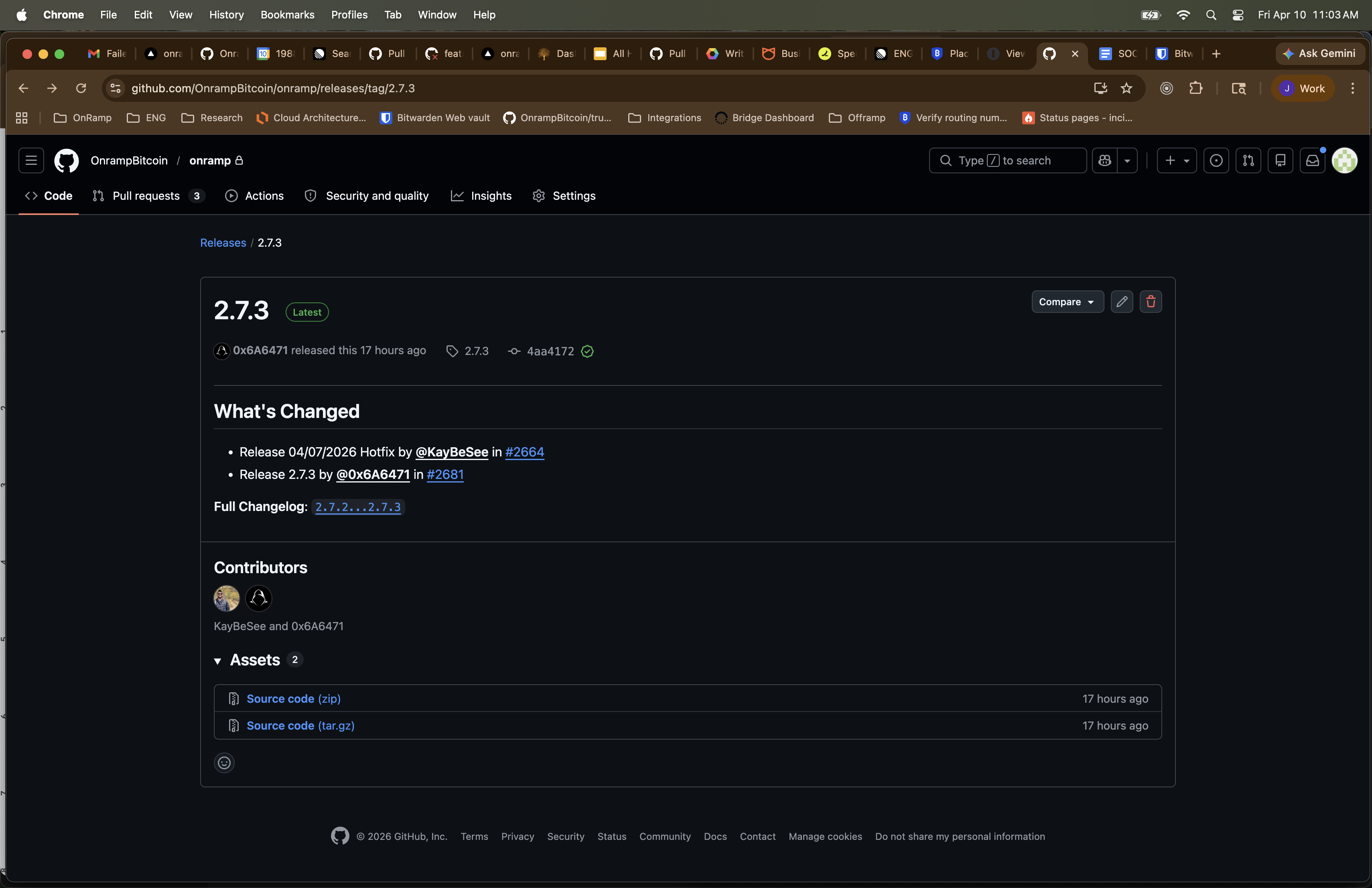 Captured on 2026-04-10 — GitHub release 2.7.3 tagged at commit
 4aa4172. Contributors: KayBeSee and 0x6A6471. Date visible in top-right corner.
Deployment
Navigate to the associated deployment in Vercel
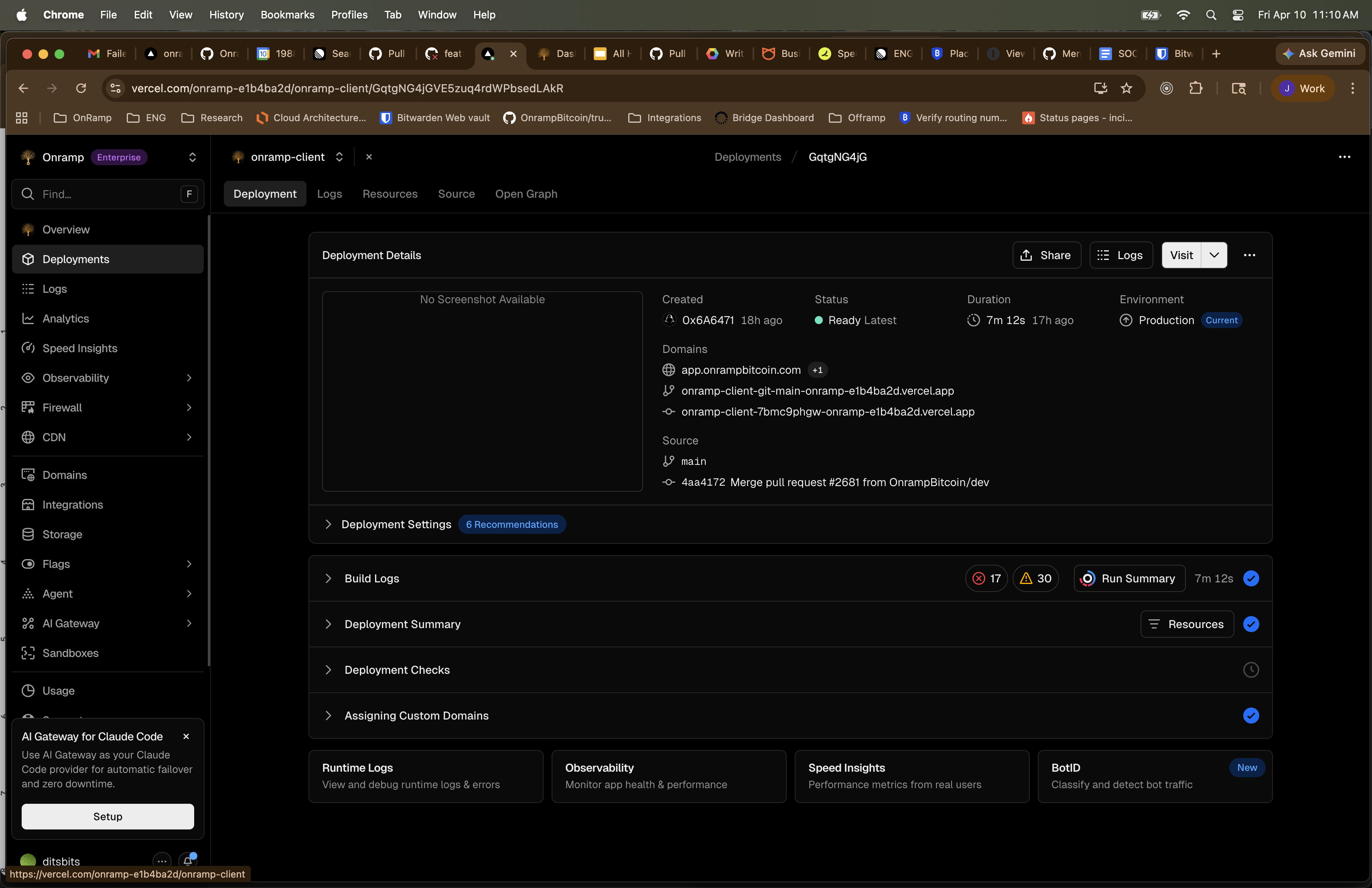 Captured on 2026-04-10 — Vercel production deployment for onramp-client. Status: Ready. Source commit
 4aa4172 from PR #2681. Domains: app.onrampcrypto.com and aliases.
GCP
Deployment Workflow
- When a pull request into main is approved and merged, it is built in Integration Cloud Build
- To deploy, navigate to the Production Cloud Build truggers.
-
Run the
promote-imagetrigger, by clicking Run and fill out the_DIGESTand_TAG -
Retrieve the release candidate digest from Integration Artifact Registry
- Copy the digest and paste it into
_DIGEST -
Input the releas tag, this should correspond to a relase in GitHub
-
Once,
promote-imagehas succeeded, it will queue the Cloud Build Deployment trigger. The trigger will not run until approved by a senior engineer - Senior engineer approves the deployment trigger and it will deploy to:
- Cloud Run Service
- Cloud Run Migration Job
- Cloud Run Seed Runner
Evidence Collection Instructions
Be sure to collect a screenshot of each step in the process, be sure to highlight the date, digests when possible, tags where relevant. Each piece of evidence will include a link to where it is collected (this link should be updated)
Evidence
Integration CI/CD - Container Build
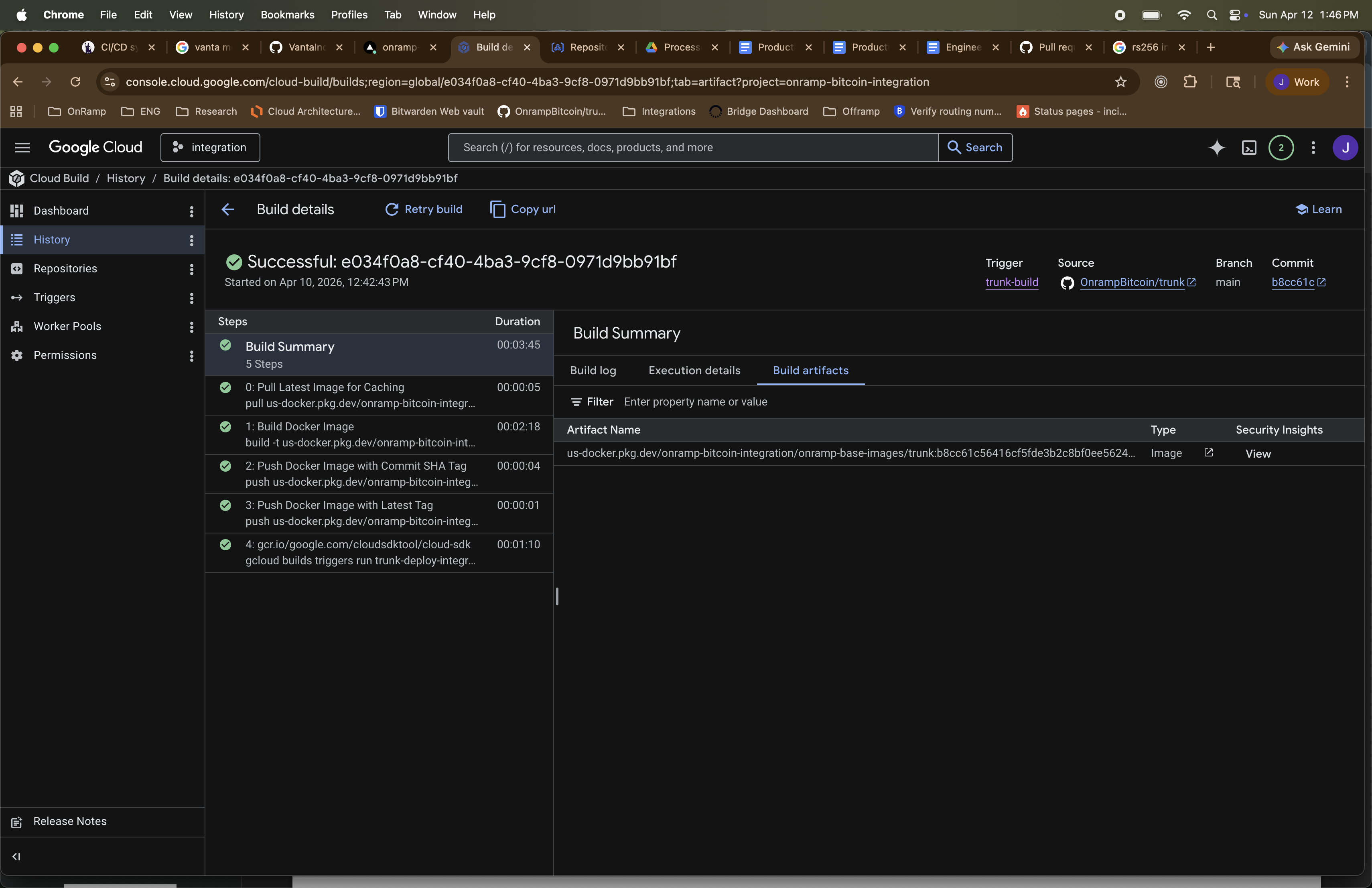 Captured on 2026-04-10 — Cloud Build
 e034f0a8 successful in onramp-bitcoin-integration. 5-step build pipeline including Docker image push with commit SHA tag. Build artifact visible with digest.
Integration CI/CD - Artficact Registry
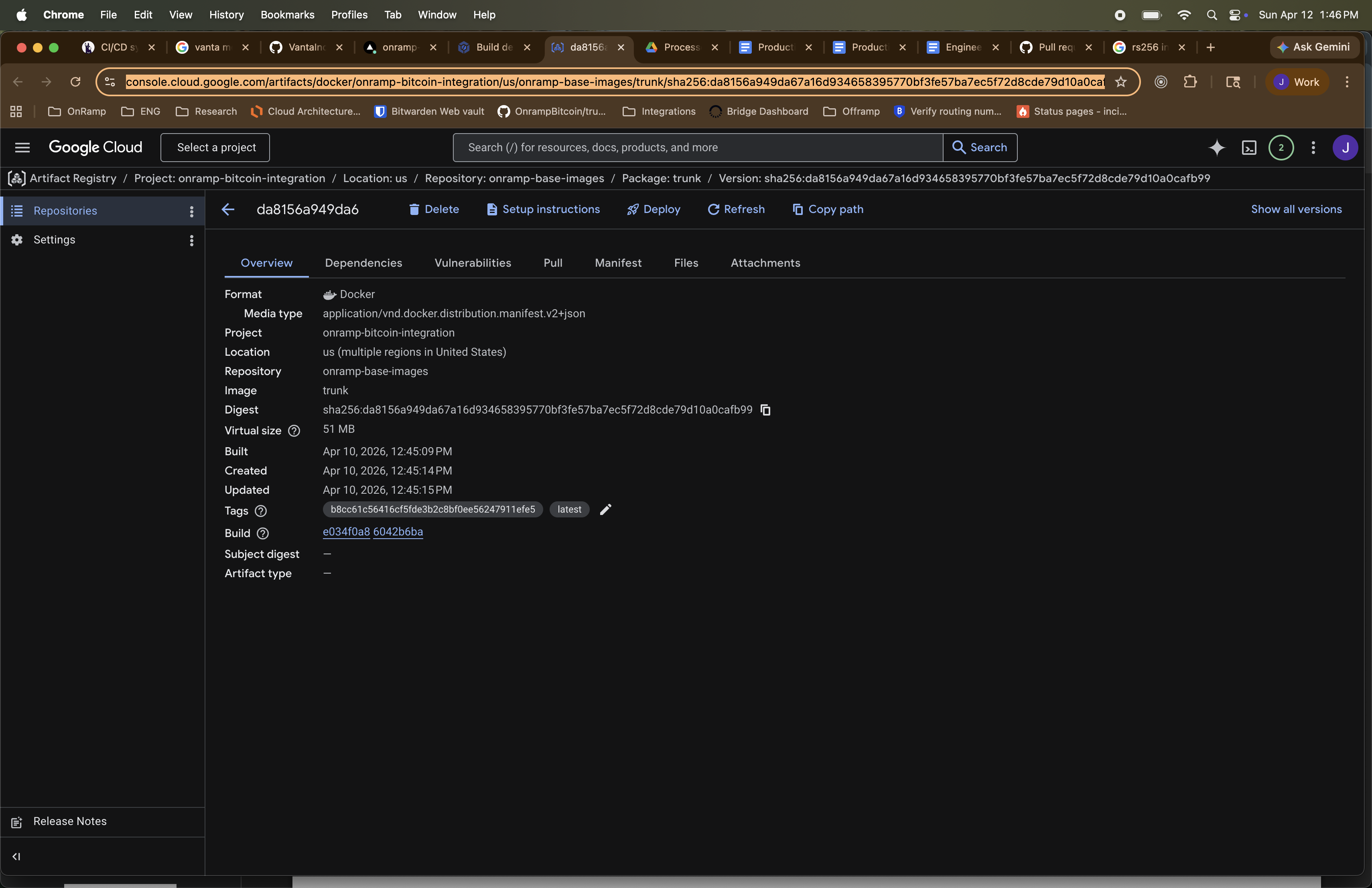 Captured on 2026-04-10 — Artifact Registry entry in onramp-bitcoin-integration for trunk image. Digest
 sha256:da8156a... with build and tag metadata. Image: trunk, Repository: onramp-base-images.
Vulnerability Scanning
- The digest is included as Version: DIGEST
Vulnerability Scanning Results
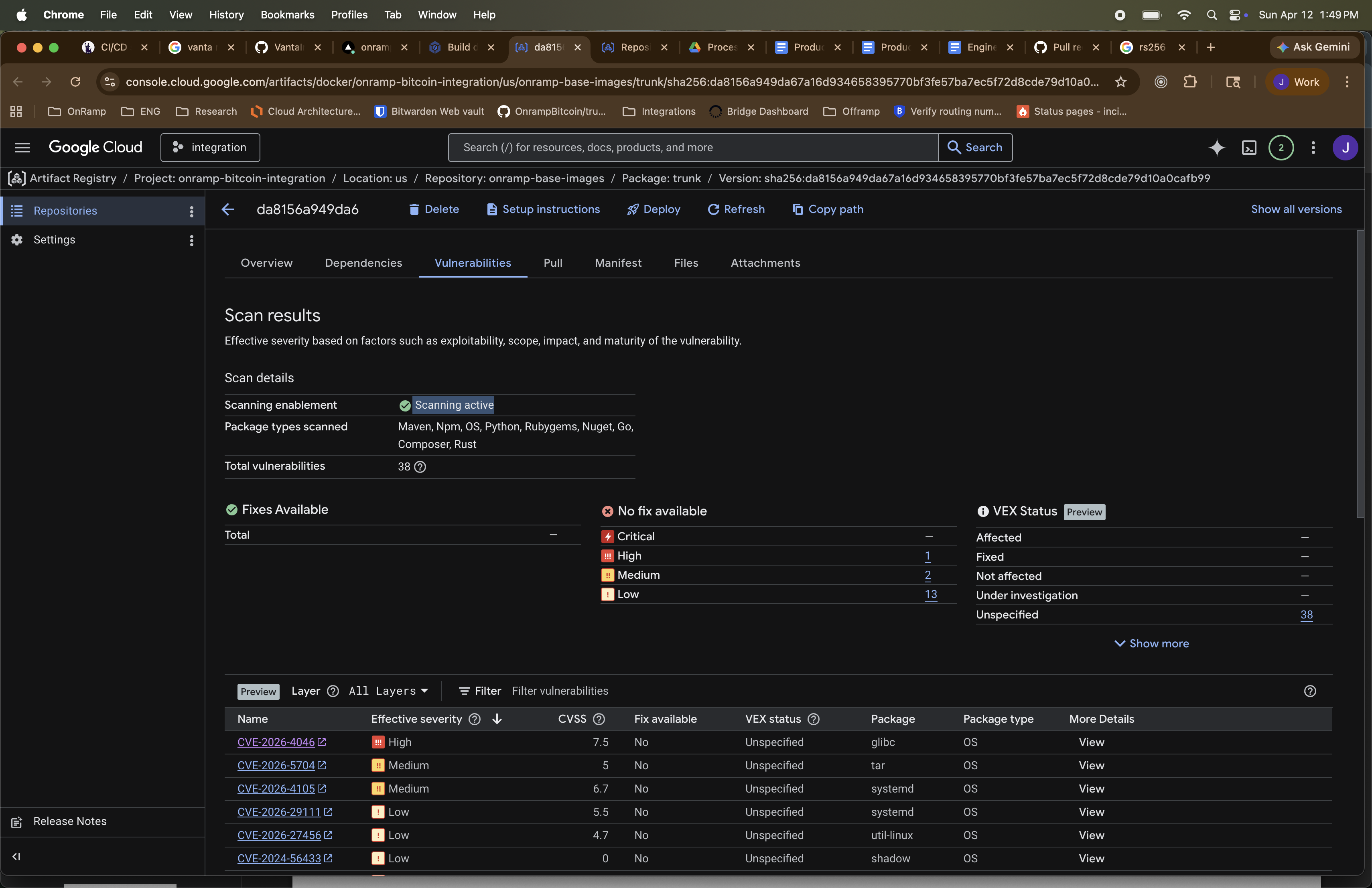 Captured on 2026-04-10 — Vulnerability scan for trunk image digest
 sha256:da8156a.... Scanning active across Maven, Npm, OS, Python, Rubygems, NuGet, Go, Composer, and Rust. 10 total vulnerabilities, no critical severity.
Promote and Deployment Image History
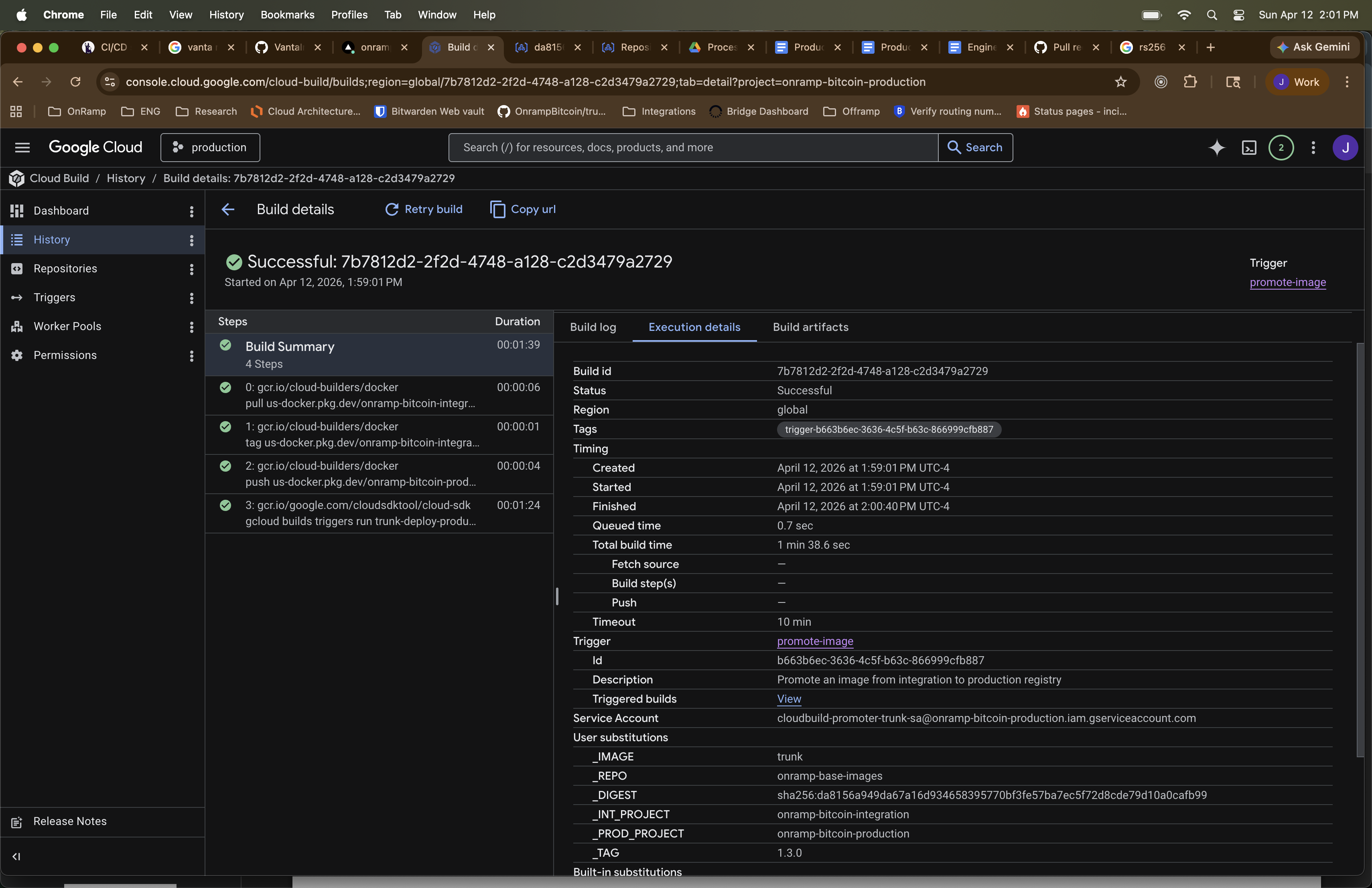 Captured on 2026-04-12 — Cloud Build
 7b7812d2 successful in onramp-bitcoin-production. Promote-image trigger promoting digest sha256:da8156a... from integration to production Artifact Registry. Tag: 1.3.0.
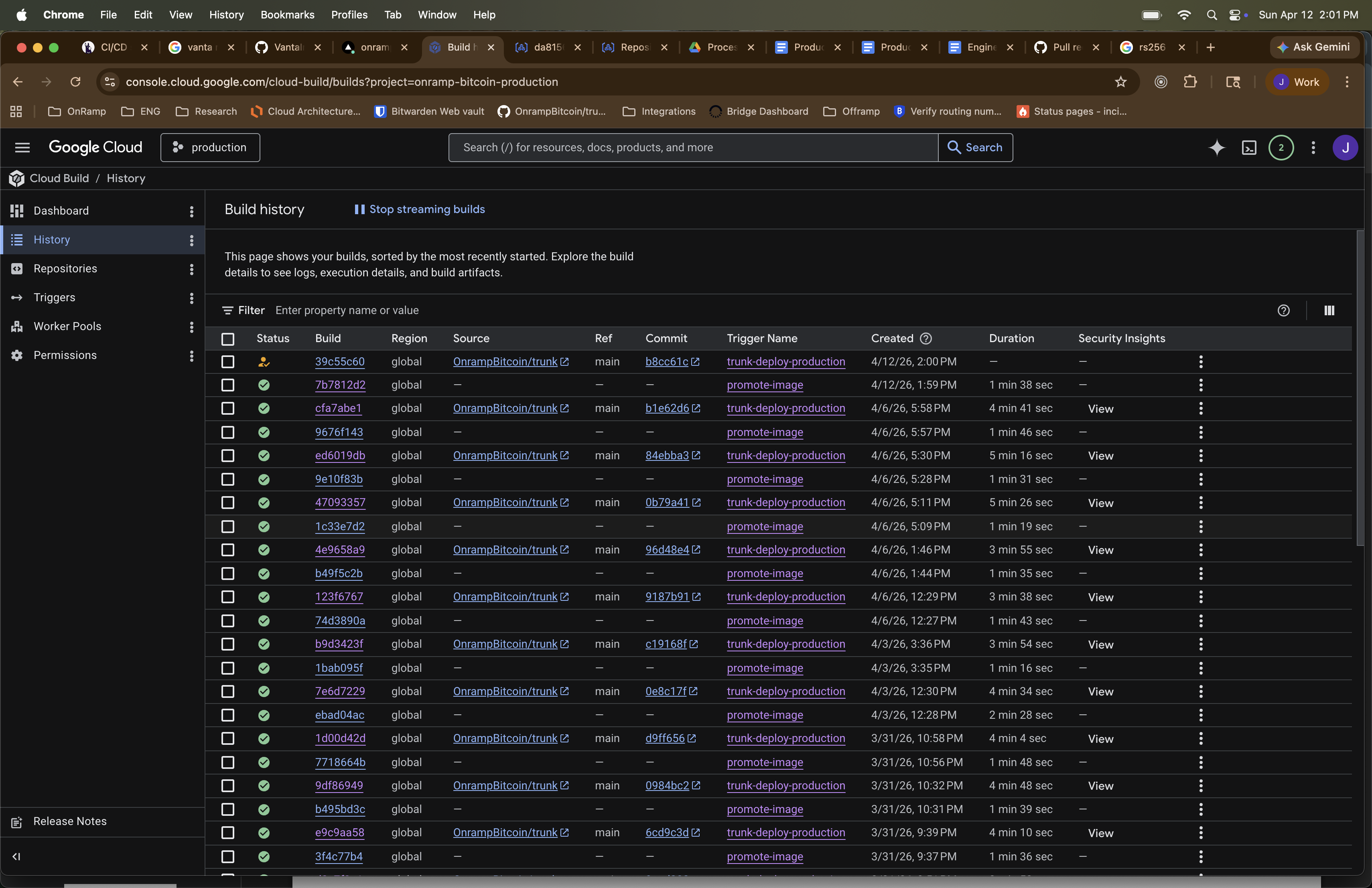 Captured on 2026-04-12 — Cloud Build history in onramp-bitcoin-production showing promote-image and deployment trigger executions.
Deployment awaiting Approval
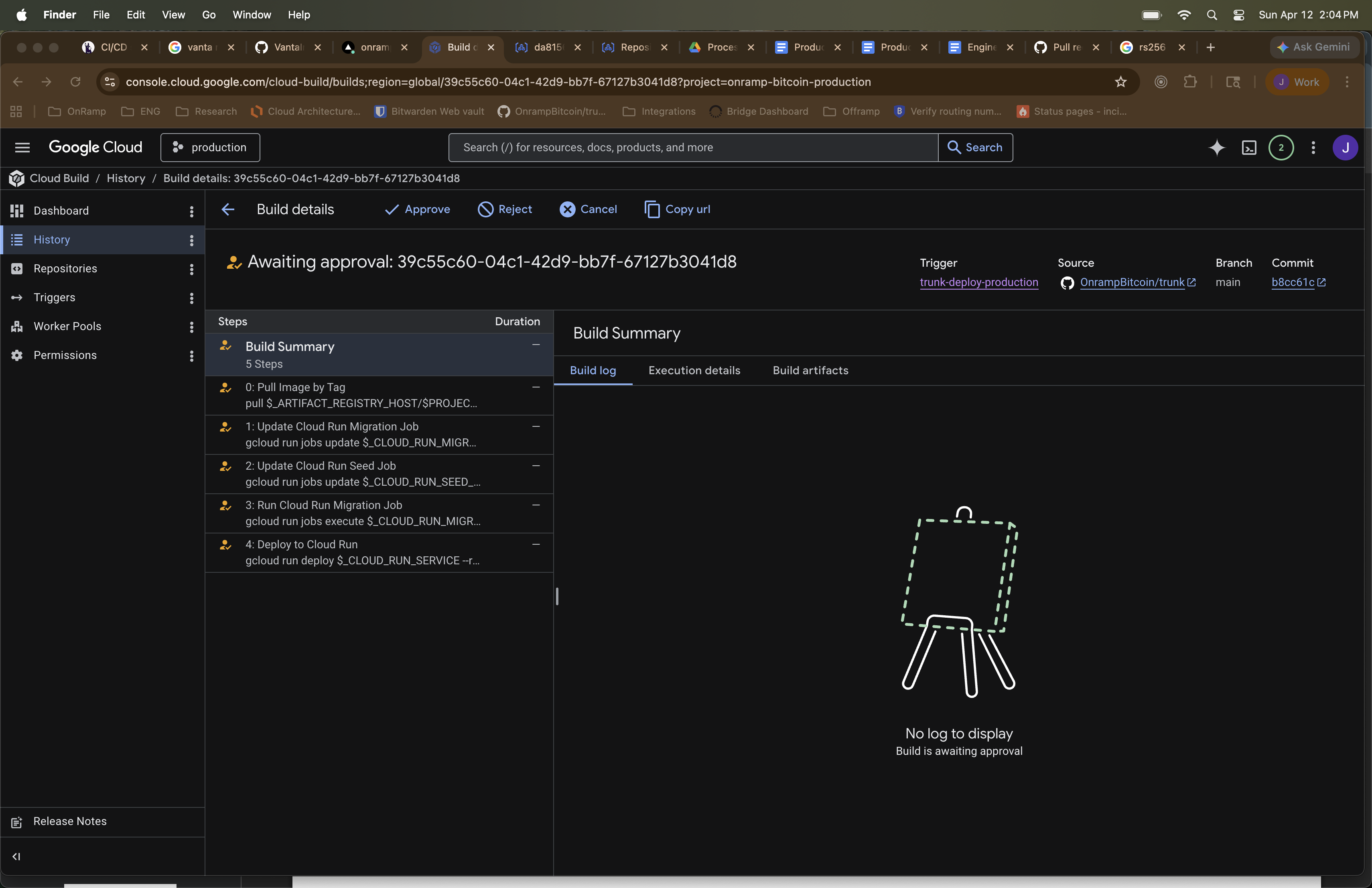 Captured on 2026-04-12 — Cloud Build
 39c55c60 awaiting approval in onramp-bitcoin-production. Deployment trigger queued with 5 steps including Cloud Run service, migration job, and seed runner updates.
Cloud Run Deployment
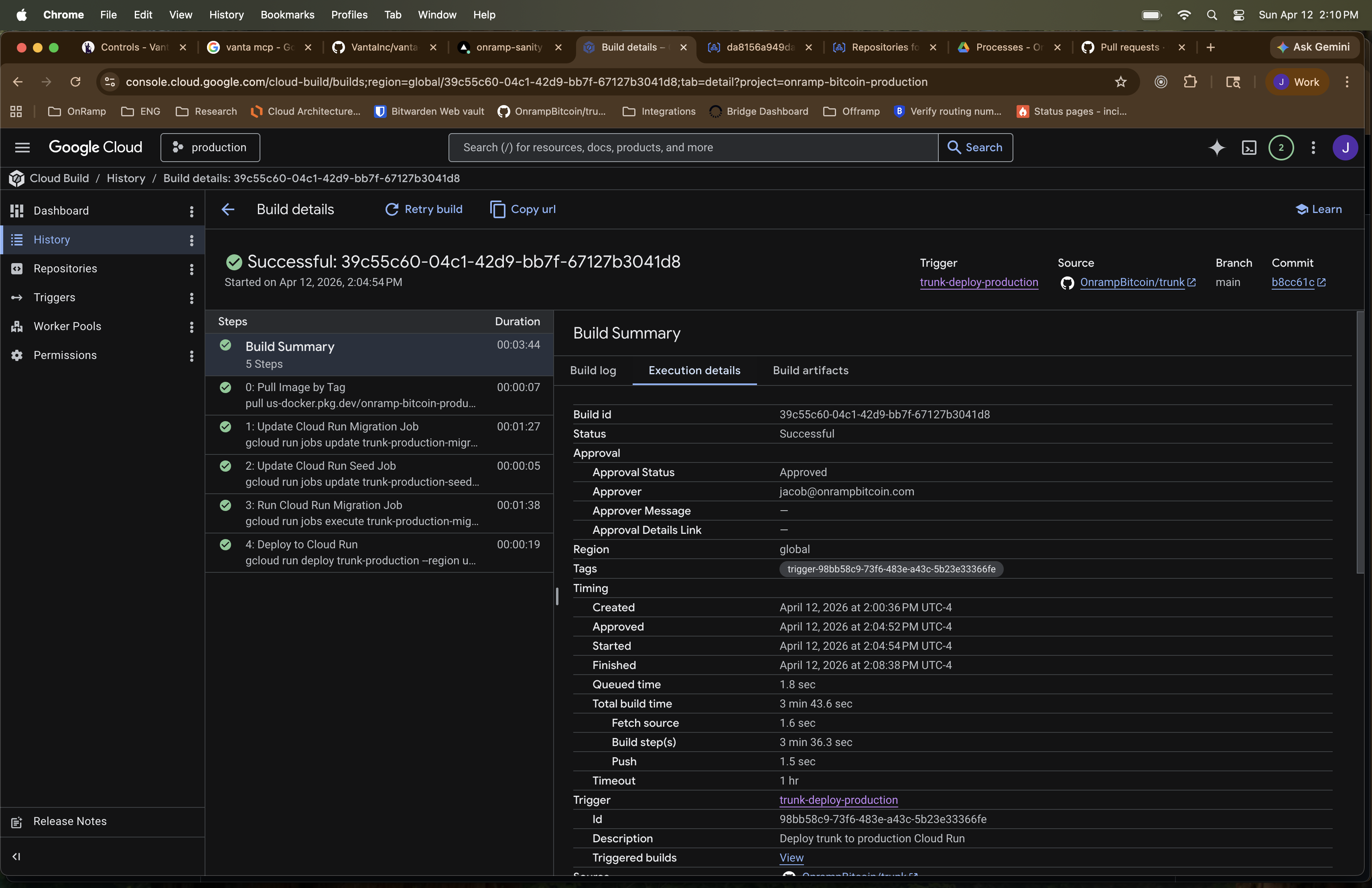 Captured on 2026-04-12 — Cloud Build
 39c55c60 successful in onramp-bitcoin-production. Approved by senior engineer. 5-step deployment completed including Cloud Run service deploy, migration job, and seed runner.
Cloud Run Service
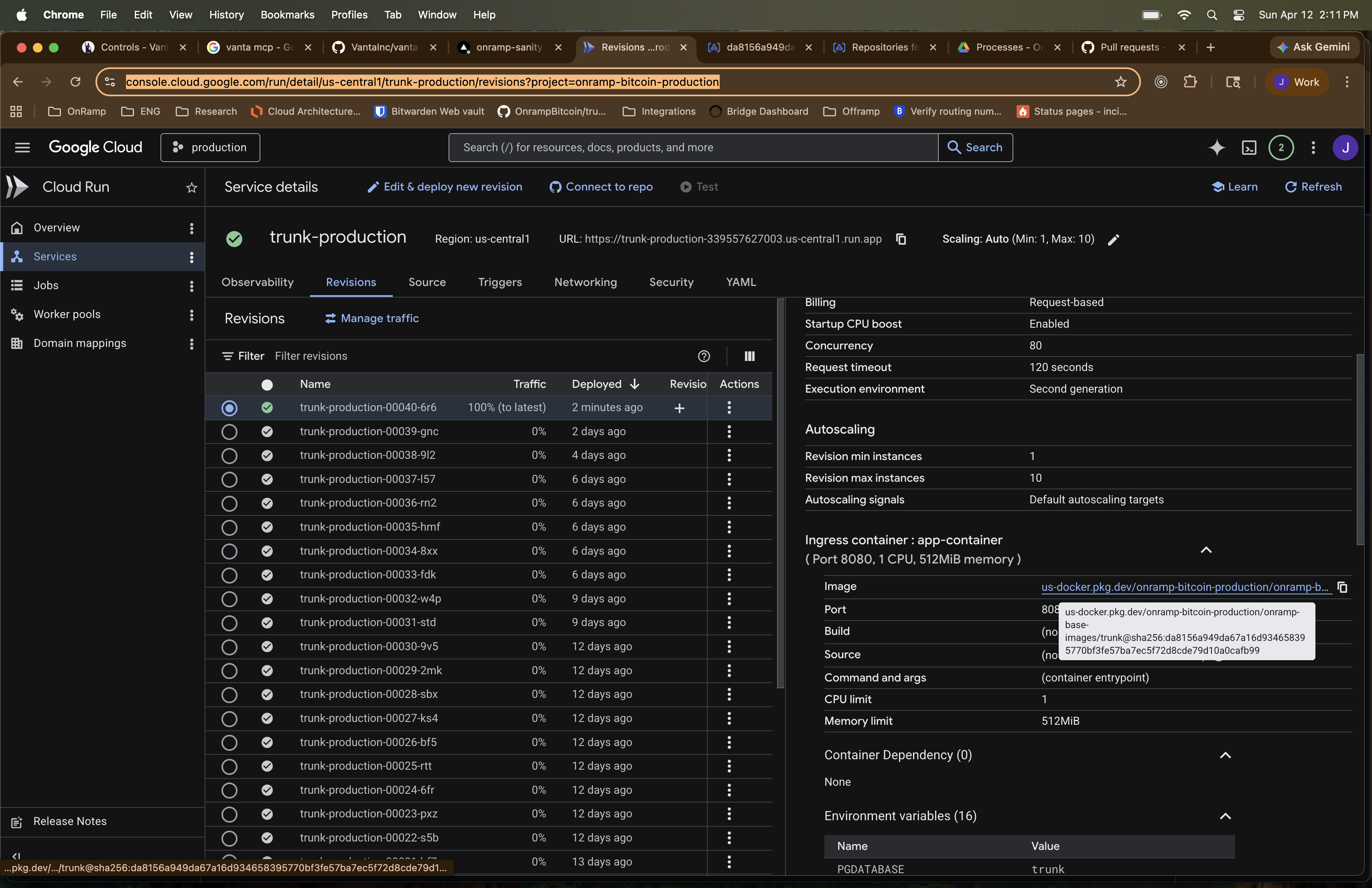 Captured on 2026-04-12 — Cloud Run service
 trunk-production in us-central1. Latest revision trunk-production-00043-fxk serving 100% traffic. Image sourced from production Artifact Registry with matching digest.
GitHub Release
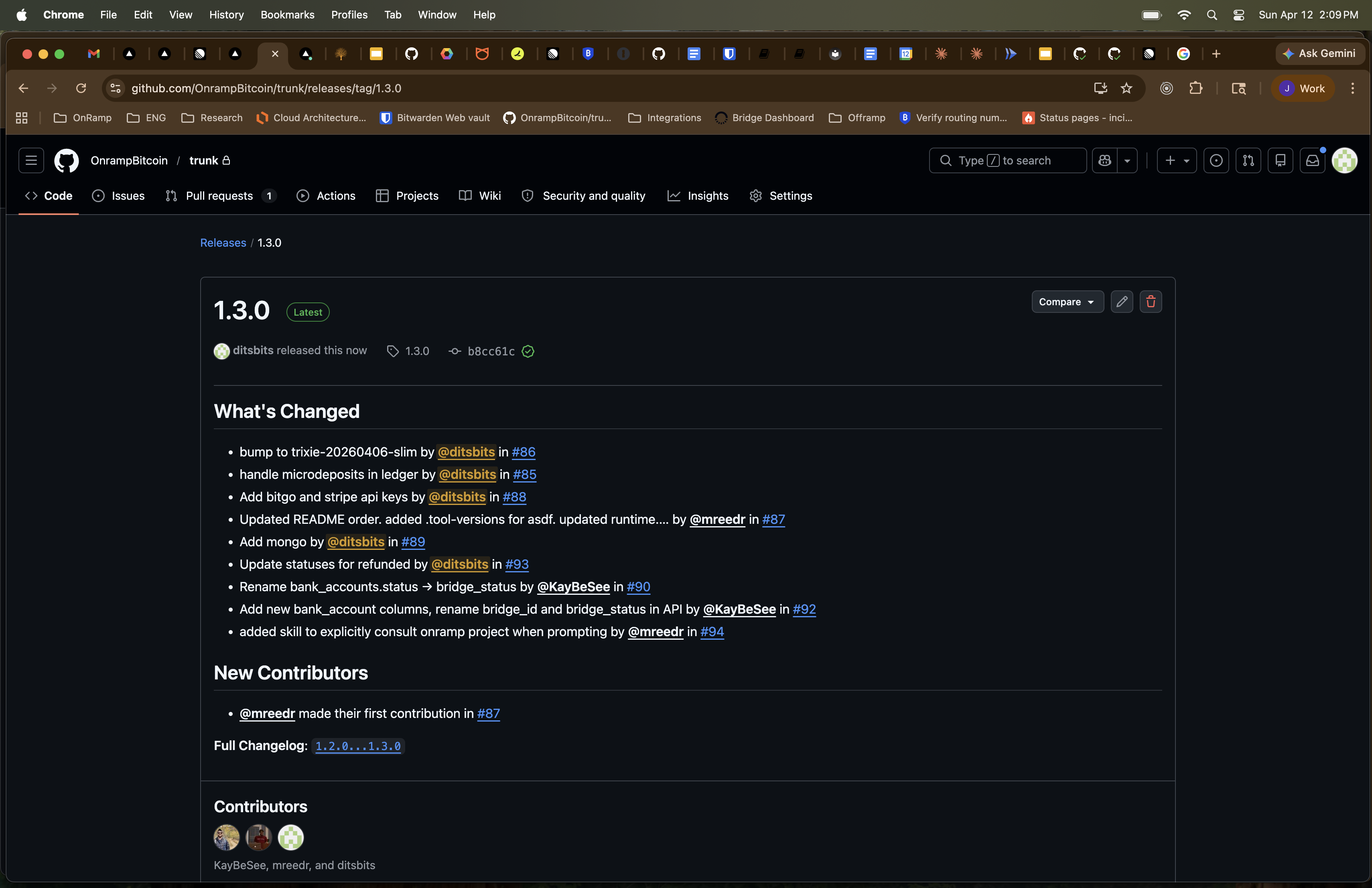 Captured on 2026-04-12 — GitHub release 1.3.0 (Latest) for OnrampBitcoin/trunk. Changelog includes microdeposits, bpay/stripe API keys, bank_account schema changes, and tool-versions updates. Contributors: ditsbits, KayBeSee, dmreedr.